TipsJuly 30, 2026·7 min read

AI Transcribe Audio to Text for Students and Professionals

Making sure capturing what is spoken never gets in the way of understanding it — for students, professionals, and researchers.

AI Transcribe Audio to Text for Students and Professionals

Most of us have been in a lecture or meeting where we missed something important because we were too busy writing to actually listen. That trade-off is frustrating, and artificial intelligence is quickly making it obsolete. The ability to AI transcribe audio to text has shifted from a niche professional tool to something students, researchers, and business teams rely on every single day. At Note Genie, we use artificial intelligence to make sure capturing what is spoken never gets in the way of understanding it.

Here is why this matters right now:

Why Students Actually Benefit From AI Transcription

The common assumption is that AI note taking for students is mostly a convenience play. In reality, it changes how students process information. When you are in a fast-moving lecture, your brain splits attention between listening and writing, and that trade-off reduces comprehension. Offloading the writing to a speech recognition system frees up mental bandwidth to actually follow the argument.

Here is what a realistic student workflow looks like with Note Genie:

  • Record the lecture using the mobile app offline, no Wi-Fi dependency needed
  • After class, the transcript is ready alongside an AI-generated summary
  • Search the full text to find where a specific term was introduced and build targeted study materials

Non-native English speakers and students who process information at a different pace benefit most, since they can read at their own speed without losing content. For knowledge management across courses, all recordings stay organized in one searchable place.

How Business Professionals Use AI Meeting Transcription Day-to-Day

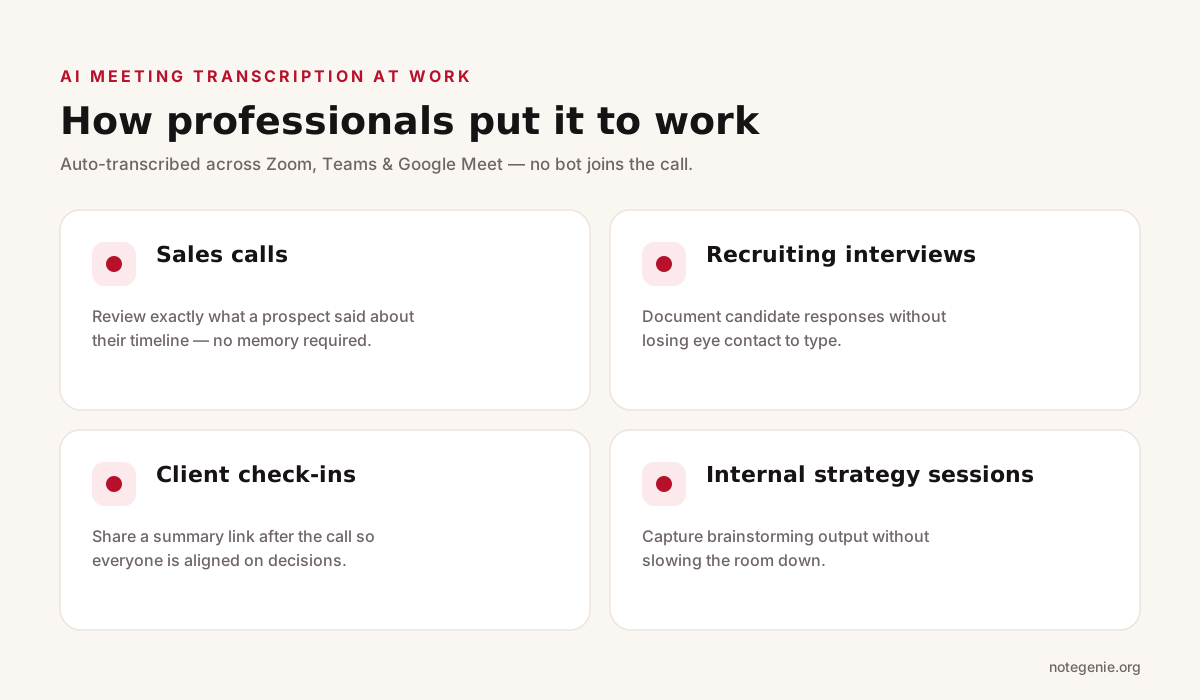
Infographic showing four ways professionals use AI meeting transcription: sales calls, recruiting interviews, client check-ins, and internal strategy sessions — all auto-transcribed across Zoom, Teams, and Google Meet with no bot joining the call.
Four everyday ways professionals put AI meeting transcription to work.

For professionals, meetings generate a lot of information and very little of it gets captured accurately. Someone is always assigned to take meeting notes, ends up split between listening and typing, and the resulting document is an incomplete summary of what happened.

AI meeting transcription removes that bottleneck. With Note Genie's native integrations for Zoom, Teams, and Google Meet, the meeting is transcribed automatically without a bot joining the call. Speaker labels are applied and you get structured meeting notes within seconds of the call ending.

Practical applications professionals use this for:

  • Sales calls. Review exactly what a prospect said about their timeline without relying on memory. Note Genie's sales call notes template structures this automatically.
  • Recruiting interviews. Document candidate responses for team review without losing eye contact to type.
  • Client check-ins. Share a summary link after the call so everyone is aligned on decisions.
  • Internal strategy sessions. Capture brainstorming output without slowing the room down.

If your team uses AI meeting transcription consistently, you also reduce a common problem: decisions made verbally that never got documented. For more on building an effective team workflow, see our guide on AI note taker for teams.

What Researchers Get From AI Transcribe Audio to Text

Researchers conducting interviews used to face a hard choice: pay for expensive human transcription services or spend hours transcribing manually. Now, a qualitative researcher doing 20 interviews over a few weeks can use Note Genie to AI transcribe audio to text for each session, get a clean transcript in minutes, and move directly into analysis. Note Genie's folder intelligence turns project folders into searchable knowledge bases, so identifying patterns across interviews becomes much faster.

For researchers who attend conferences or panels, the same workflow applies: record the session using the audio transcription tool, get the transcript, highlight what matters, and file it where it connects to existing work.

When AI Works Well and When Human Review Still Matters

We want to be straightforward about this because it matters for how you use the tool.

AI transcribe audio to text performs best when audio quality is clear, speakers are distinct, vocabulary is general rather than highly specialized, and the output is for internal use or a working draft. This covers the vast majority of student and professional use cases.

Human review is worth adding when the content involves legal proceedings requiring certified records, clinical documentation, or published direct quotes that must be letter-perfect. For those contexts, use the AI transcript as a starting draft and verify the critical sections.

The practical approach: let the speech recognition capture everything, then spend a few minutes scanning for specialized names or terms that may have been misread. You get most of the time savings with minimal accuracy risk. For a closer look at how AI handles recorded calls, our breakdown of AI call recording software covers that in more depth.

How Note Genie Simplifies This End-to-End

Infographic of Note Genie's end-to-end flow: step one capture on desktop, Chrome, or mobile with no bot; step two transcribe with speaker labels and one of 16 templates applied automatically; step three organize with search, Ask AI, and shared folders — all encrypted and never used to train models.
Audio in, organized notes out — capture, structure, and use in one flow.

Note Genie is built for people who need to AI transcribe audio to text and turn the result into organized, usable content fast. Here is what separates it from a basic audio transcription tool:

  • No bots in your meetings. The Chrome extension captures calls directly. No bot joins, no notification to other participants.
  • 16 structured templates. The artificial intelligence applies a relevant template automatically, such as lecture notes, one-on-one meeting, or project kickoff, so output is already organized.
  • Conversational AI over your notes. Ask questions like "What action items came out of Tuesday's call?" and the AI pulls the answer directly from your recorded content.
  • Shared folders for teams. Shared folders let teammates access specific recordings or entire project knowledge bases.
  • Privacy first. On-device recording with encrypted storage. Your content is never used to train models.

For teams that want to improve how meetings run overall, our overview of meeting management tools is a practical next step.

Frequently Asked Questions

Is AI transcription accurate enough for academic or professional use?

For lecture notes, meeting notes, and research drafts, yes. Leading platforms reach 95 to 99% accuracy under good conditions, which is more than sufficient for everyday working documents.

Can AI transcribe audio to text handle multiple speakers?

Modern speech recognition includes speaker identification, and Note Genie applies real speaker labels. Accuracy with multiple speakers depends on recording quality, so a clear environment helps.

Does Note Genie work offline?

The mobile app supports on-device recording without a Wi-Fi connection. Transcription and AI processing sync when you reconnect.

Is it ethical for students to use AI note taking for students in class?

Using an audio transcription tool to capture your own learning is similar to recording a lecture with permission, which most institutions allow. Always check your institution's recording policy.

Final Thoughts on AI Transcribe Audio to Text

The gap between what gets said and what gets documented has always cost people time and clarity. We built Note Genie to AI transcribe audio to text faster and more accurately than any manual method, whether you are in a lecture hall, a Zoom call, or a field interview.

Start your free trial at Note Genie.org and turn your next conversation into organized, searchable notes in under 30 seconds. No credit card required.

Turn Every Conversation Into Searchable Notes

Transcribe audio to text in under 30 seconds. Start free — no credit card required.

Get Started Free