AI Call Recording Software For Turning Meetings Into Tasks
Turning meeting discussions into structured tasks that improve clarity, productivity, and team accountability.
Have you ever left a workplace meeting unsure about who owns the next step? AI call recording software addresses this exact problem by turning conversations into clear actions.
Today, teams rely on AI call recording software to reduce confusion and keep work moving forward. Yet most workplace meetings still end with scattered notes and unclear accountability. According to the Microsoft 2023 Work Trend Index, employees spend about 57 percent of their week on meetings, emails, and chat, leaving less than half for focused work. The Microsoft 2025 Work Trend Index also found that interruptions hit every two minutes during core work hours, which creates a fragmented workday for many teams.
In this blog post, we will talk about how AI call recording software converts meeting discussions into structured tasks that improve clarity, productivity, and team accountability.
How AI Call Recording Software Actually Converts Spoken Decisions Into Actionable Tasks
Sarah's on a call. Someone says, "Hey Sarah, can you send the design specs by Friday?"
A transcription tool captures that sentence and stops. Done.
AI call recording software that works:
Recognizes "send the design specs" as a task
Tags Sarah as responsible
Pulls "Friday" as the deadline
Drops it into your project tool assigned to Sarah
Happens automatically. In seconds.
Here is how this works across different teams in a simple way. AI call recording software helps each team capture what matters without extra effort. In sales, it creates follow ups after a workplace meeting, highlights customer concerns, and tracks next steps. In engineering, it records important technical decisions as they happen so nothing gets lost. In HR, it turns interview conversations into clear candidate evaluations without sorting through notes.
Call recording software with AI insights also changes how people communicate. When a workplace meeting is recorded and analyzed, people become more clear about what they say. They know their words can turn into tasks. AI call recording software then assigns work based on what was actually said, along with the full context. This removes confusion and reduces the need to argue about who agreed to what.
The Features That Separate Genuine AI Meeting Recorders From Basic Transcription Tools
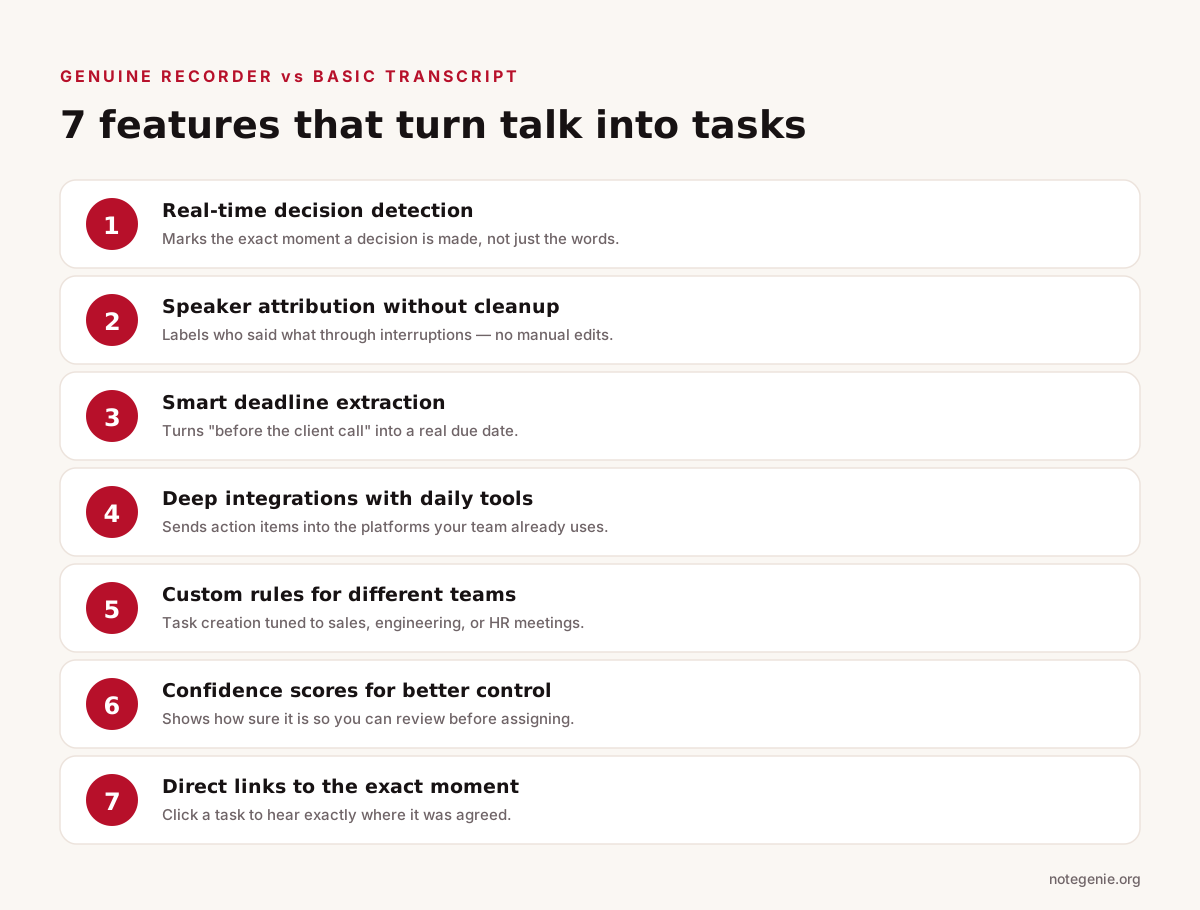
Seven features that turn a recorded meeting into reliable action.
Not all AI call recording software delivers the same results. Many tools promise automation but only provide transcripts. If you want real productivity gains, you need features that turn a workplace meeting into clear, reliable action.
1. Real-Time Decision Detection
Basic tools record everything but understand nothing. Strong AI call recording software identifies the exact moment a decision happens. It recognizes phrases like "let's move forward" or "we will go with option B" and marks them as outcomes. This matters because teams often waste time revisiting decisions that were already made but never documented clearly.
2. Accurate Speaker Attribution Without Cleanup
In real workplace meetings, people interrupt, talk over each other, and jump between topics. Call recording software with AI insights must correctly label who said what without manual edits. If the system gets this wrong, tasks get assigned to the wrong person and trust in the tool drops quickly.
3. Smart Deadline Extraction From Natural Language
People rarely speak in exact dates. They say things like "before the client call" or "next quarter." Advanced AI call recording software translates these into actual deadlines based on context. This removes the need for someone to interpret vague timelines after the meeting ends.
4. Deep Integrations With Daily Tools
Capturing tasks means nothing if they sit in a dashboard no one checks. The best tools push tasks directly into platforms teams already use like Slack, Asana, or Jira. This keeps workflows uninterrupted and ensures action items get seen and completed.
5. Custom Rules for Different Teams
Each team works differently. Sales teams focus on follow ups and deal stages. Engineering teams track technical decisions and blockers. Good AI call recording software lets you define how tasks are created based on the type of workplace meeting. This prevents irrelevant or poorly structured tasks from cluttering your system.
6. Confidence Scores for Better Control
AI is powerful but not perfect. High quality systems show how confident they are about each extracted task. This allows teams to quickly review and approve items before they get assigned. It prevents incorrect tasks from spreading across your workflow and creating more work instead of less.
7. Direct Links to the Exact Moment in the Recording
Context matters. When someone receives a task, they should be able to click and hear the exact part of the conversation where it was discussed. This feature removes ambiguity and avoids back and forth conversations about what was actually said. It strengthens accountability because everything is tied to a real moment in the workplace meeting.
Head to Head: Top AI Call Recording Platforms Ranked by Task Automation Accuracy in 2026
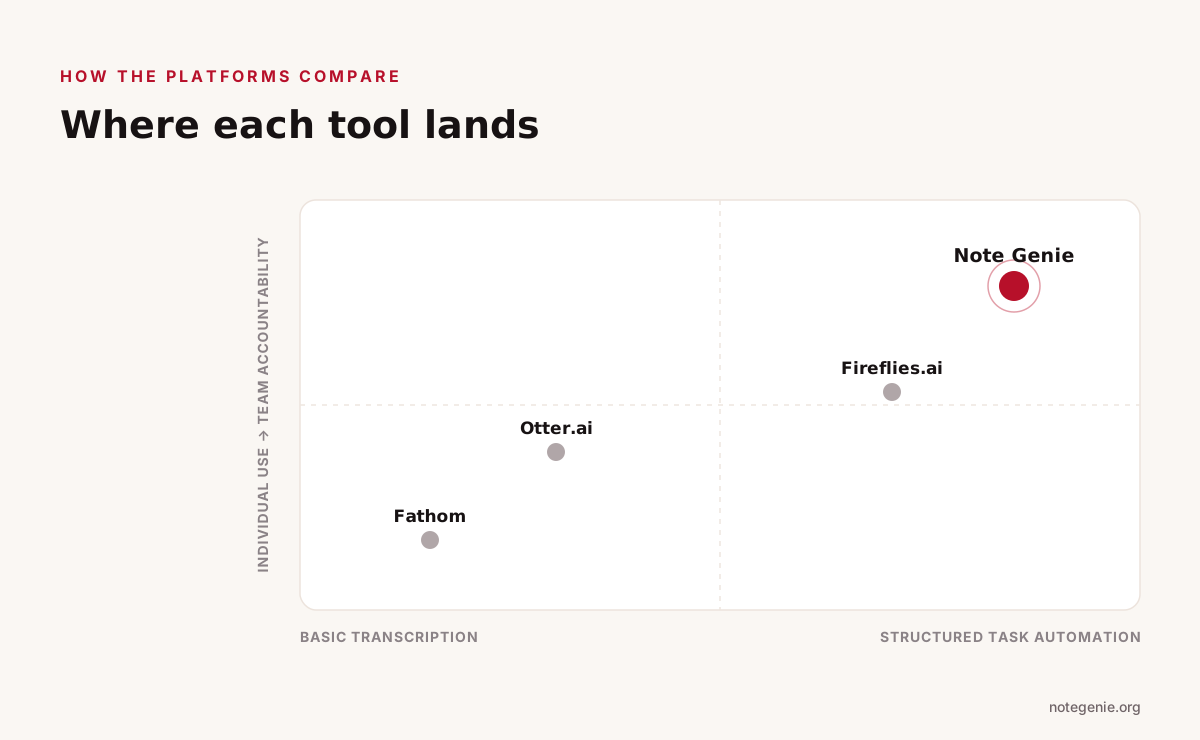
Where the leading platforms land on task automation and team accountability.
Not all AI call recording software converts conversations into reliable tasks. Some tools focus on transcription, while others try to automate workflows. The table below compares how leading platforms perform based on real capabilities like task extraction, integrations, and accuracy.
Detailed Comparison of AI Call Recording Software
Feature
Note Genie
Otter.ai
Fireflies.ai
Fathom
Core Strength
Structured knowledge and task automation
Real time transcription and note sharing
Workflow automation and integrations
Fast summaries for individuals
Task Detection Accuracy
High including implied and contextual tasks
Moderate mostly explicit statements
Good but may create false or "phantom" tasks (PickGenius Lab)
Good but can merge speakers in overlap cases (PickGenius Lab)
Moderate accuracy
Meeting Context Understanding
Uses templates and cross meeting insights
Minimal context awareness
Good for structured meetings
Limited context depth
Integrations
Native integrations with Zoom, Teams, and Google Meet — no bot required
Basic integrations
Extensive integrations across 60 plus tools (TechRadar)
Basic CRM and tool connections
Workflow Automation
End to end from recording to structured action items with owners
Low mostly transcription focused
High especially for sales and CRM workflows (SaaS Compared)
Low focused on summaries
Ease of Setup
Works across desktop, mobile, browser and offline
Easy to start
Moderate setup for full automation
Very easy minimal setup
Best For
Teams that want structured outputs and accountability
Individuals and teams needing transcripts
Sales and operations teams needing automation
Individuals or small teams
What Actually Separates These Tools
The biggest difference comes down to how each platform handles context and execution.
Otter.ai captures conversations well but often stops at text.
Fathom focuses on speed and simplicity, which works for personal use but limits team workflows.
Fireflies.ai pushes deeper into automation and integrations, especially for CRM driven teams.
Note Genie connects transcription, structured summaries, templates, and task assignment into one system.
That last point matters most. Many tools can generate tasks, but fewer can reduce false positives while still capturing meaningful commitments. When your system creates fewer incorrect tasks and still catches what matters, your workflow stays clean and your team trusts the output.
Your AI call recording software either handles this or it becomes your legal problem.
Required features: consent disclosures that work, automatic deletion after retention periods, clear access controls, audit trails.
If a platform doesn't show SOC 2 or ISO 27001 certifications, that's a red flag. If they won't explain GDPR compliance, move on.
FAQs
Can AI record phone calls?
Yes, AI call recording software can record phone calls and then transcribe, summarize, and extract action items. Some tools also analyze each workplace meeting to turn conversations into structured tasks.
How to tell if someone is recording your call with their phone?
In many cases, you will hear a voice prompt or beep at the start of the call. Call recording software with AI insights often requires consent notifications, depending on local laws and platform settings.
How do I stop my phone from auto recording calls?
Check your phone's call settings or the recording app you use and turn off automatic recording. You can also disable permissions or uninstall any AI call recording software that enables this feature.
Final Thoughts on AI Call Recording Software For Turning Meetings Into Tasks
Meetings aren't going anywhere. But how you handle what comes out of them doesn't have to stay broken.
AI call recording software that generates tasks is becoming standard for organizations that care about efficiency. The 60% time savings isn't theoretical, it's what happens when you stop doing manual work machines handle in milliseconds.
When evaluating platforms, focus on accuracy (false positives are worse than false negatives), integration depth, and compliance details.
Start small. Pick one team. Run 30 days. Track baseline overhead before and after. The data tells the story better than any vendor pitch.
The gap between how workplace meetings work now and how they could work is closing. It's just a matter of which tool you pick.
Turn Your Meetings Into Action Items
Structured summaries with owners and deadlines — automatically. Start free.