AI Note Taker for Teams: Buying Guide for Growing Businesses
The right AI note taker does not just record your meetings. It changes what happens after them.
Most software buying decisions for growing teams start the same way. Someone demos a tool, shares a Slack message saying "this looks great," and three weeks later nothing has changed because no one knew what to actually evaluate. Choosing the right AI note taker for teams is not a feature checklist exercise. It is a workflow decision, a budget decision, and for some industries, a compliance decision. Getting it wrong means paying for something that quietly gets abandoned. Getting it right means your team reclaims real time, closes real gaps in accountability, and builds a searchable record of its own decisions.
The right AI note taker does not just record your meetings. It changes what happens after them.
62% of users report saving 4 hours per week with AI meeting assistance, which adds up to roughly a full month of productive time reclaimed per user, per year. (Laxis, State of Meeting Note-Taking 2026)
75% of professionals now use an AI note taker in their work meetings, according to Fellow.ai's 2025 survey. (Peter Claridge, 2026)
What "AI Note Taker for Teams" Actually Means
There is a difference between an AI note taker built for individual users and one designed to work at the team level. Individual tools capture and summarize. A genuine AI note taker for teams goes further: shared folders, collaborative access to recordings, cross-meeting insights, and the ability to ask questions across a project's entire history.
When we talk about AI for note taking at the team level, here is what that looks like in practice:
Multiple people can access the same meeting recordings without someone forwarding a file
Action items are assigned to specific people, not just listed
A project folder accumulates knowledge over time, not just one-off notes
Anyone who missed a meeting can catch up without a separate recap email
The team's decisions live somewhere searchable, not in someone's personal notes folder
That last point matters a lot for growing businesses. When your team goes from five people to fifteen, decisions made in meetings six months ago disappear if they were only ever in one person's notes. A good AI note taker for teams solves this by making meeting documentation systematic, not personal.
The 6 Evaluation Criteria That Actually Matter
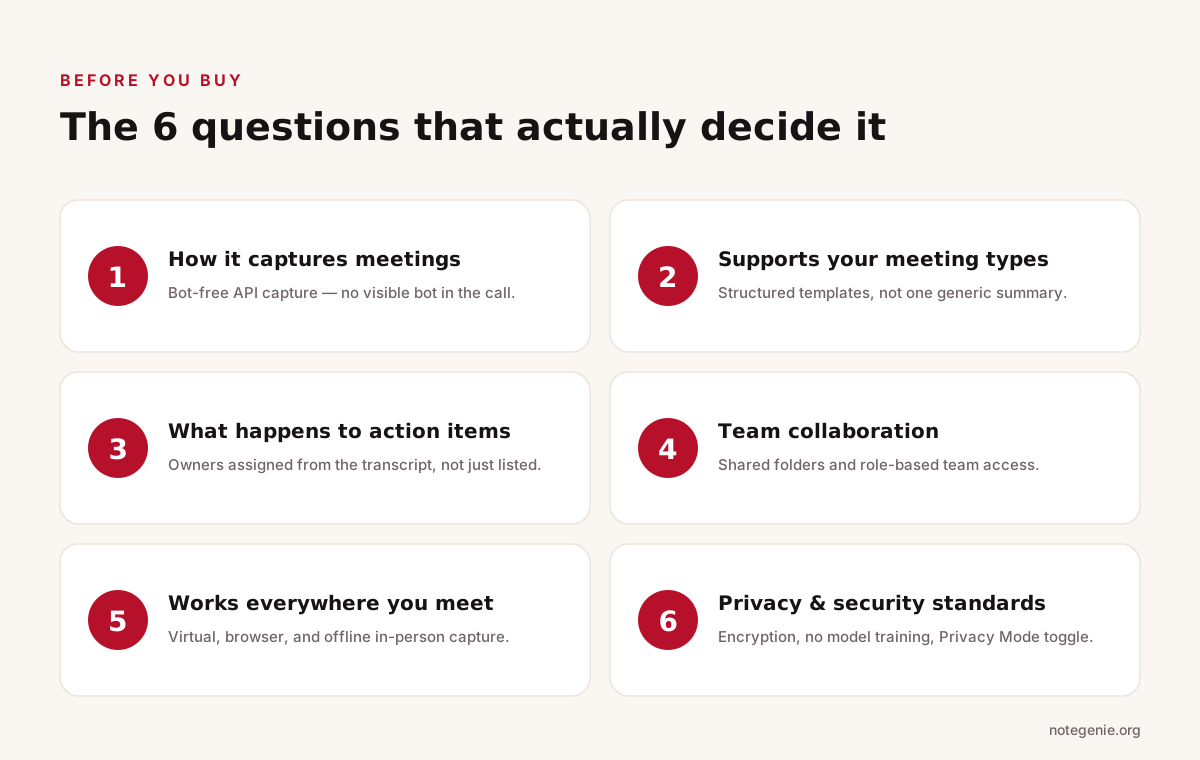
The six questions to align on before you start a single trial.
Before you sign up for a trial, your team should align on what you are actually evaluating. Most buyers focus on transcription quality and price. Those matter, but they are not the full picture.
1. How does it capture meetings?
Some tools send a bot into your calls as a visible participant. Others integrate directly with the platform at the API level. This matters more than most buyers realize. Research shows 84% of users change their behavior or withhold information when they notice an AI bot in a call. Bot-free capture, like Note Genie's native integrations with Zoom, Teams, and Google Meet, avoids this entirely.
2. Does it support your meeting types?
A general-purpose AI for note taking will produce a generic summary regardless of whether you just ran a sales call, a project kickoff, or a 1:1. Purpose-built tools use structured templates that extract what matters for that specific meeting type. Note Genie offers 16 industry-specific summary templates, covering MEDDPICC sales calls, SOAP medical notes, interview scorecards, and more.
3. What happens to action items?
Listing action items in a summary is not the same as assigning them. Look for tools that surface task owners based on what was actually said, not just formatted in a to-do style. Note Genie's automatic action item extraction pulls commitments directly from the transcript and flags who is responsible.
4. Can your team collaborate on it?
A note taker that only works for the person who recorded the meeting has limited team value. Look for shared folders, role-based access, and shareable summaries. Note Genie's shared folders and collaboration features let you organize recordings by project or client and give everyone access to the same knowledge base.
5. Does it work across all your meeting environments?
Remote, hybrid, and in-person teams have different recording needs. Note Genie works as a desktop app for virtual meetings, a Chrome extension for browser-based calls, and a mobile app with on-device recording for in-person conversations that works offline.
6. What are the privacy and security standards?
Where is your audio stored? Is it used to train AI models? Can employees turn off cloud capture? Note Genie uses AES-256 encryption at rest and HTTPS/TLS in transit, recordings are never used for model training, and the Privacy Mode feature disables all cloud capture with one toggle.
How to Match Your Team Size to the Right Plan
Not every team needs the same level of capability. Here is a practical framework based on team size and meeting volume.
Team Profile
Meeting Volume
Recommended Starting Point
Solo or small team (1-3 people)
Light, under 100 min/month
Note Genie Free or Light Pro
Growing team (4-10 people)
Moderate, 100-300 min/month per person
Note Genie Pro
Active cross-functional team
Heavy, 300+ min/month, multiple projects
Note Genie Power User
Mixed remote and in-person team
Varied, needs offline mobile capture
Any paid plan with mobile app
Note Genie's pricing starts free with no credit card required, which means your team can evaluate it on real meetings before committing. The Pro plan at $7.99/month adds custom AI instructions and automated email recaps, which is where teams typically see the biggest follow-up improvement. The Power User plan at $19.99/month includes 1,000 minutes of monthly processing and unlimited AI queries, which fits teams running high volumes across multiple client projects.
Implementation Considerations Most Buyers Skip
Buying the tool is step one. Getting your team to actually use it consistently is step two, and it is the harder one. Here is what we have seen work for growing businesses adopting an AI note taker for the first time.
Start with one use case, not all of them. Pick the meeting type where your team feels the most pain from poor notes. For most teams, that is either client calls or project check-ins. Get everyone on the same system for that one meeting type before expanding to others.
Agree on folder structure before you start. Note Genie's Folder Intelligence works best when recordings are organized by project or client from the beginning. Decide how you will name and organize folders before the first recording goes in.
Use the email recaps as your team's follow-up default. Note Genie's automated email recaps deliver structured summaries with action items directly to your inbox after each recording. This removes the post-meeting writing task entirely and is one of the most practical ways to learn how to be a better note taker as a team rather than relying on one person each time.
Set expectations with external participants. If you are recording client calls or vendor meetings, make sure everyone on the call knows recording is happening. This is both a legal requirement in many jurisdictions and good practice for building trust.
The Real Cost-Benefit Calculation
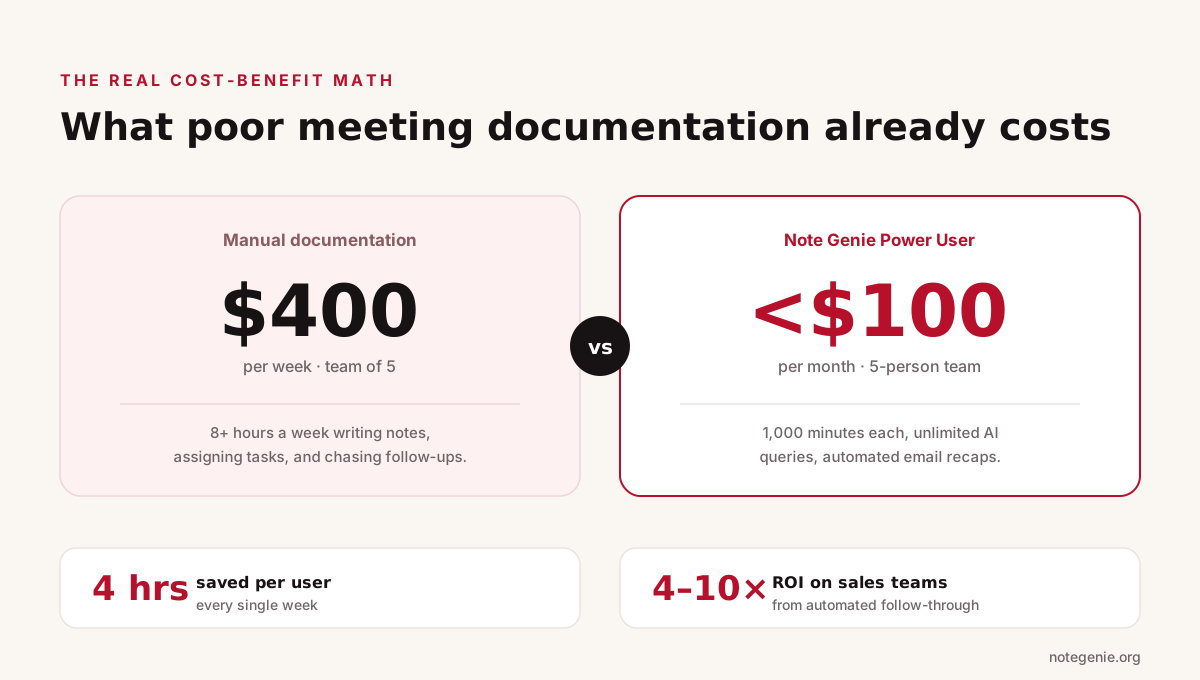
The honest ROI math: what manual documentation costs versus the tool.
When evaluating an AI note taker for teams, the honest ROI math is straightforward. The question is not whether the tool costs money. The question is what poor meeting documentation is already costing you.
Consider a team of five people who each spend 20 minutes after every meeting writing notes, assigning tasks, and sending follow-ups. At five meetings per week per person, that is over 8 hours of post-meeting documentation time per week across the team. At a fully-loaded employee cost of $50/hour, that is $400/week in documentation work alone.
Beyond time, there is the cost of errors. Sales teams typically see 4-10x ROI on AI note taker deployment, driven primarily by automated follow-through on commitments made during calls. For teams closing deals or managing client relationships, missed follow-ups translate directly to lost revenue.
Note Genie's Power User plan for a five-person team runs under $100/month. That is a fraction of what manual documentation costs, and it removes the inconsistency that comes from notes that depend entirely on who was paying attention that day.
What to Look For in AI for Note Taking at the Team Level
Learning how to be a better note taker as a team means building a system, not just buying a tool. Here is a practical checklist for evaluating any AI note taker for teams before committing.
Does it capture all your meeting environments (virtual, browser, in-person)?
Does it support multiple speakers with accurate attribution?
Does it use structured templates, or does it produce generic summaries?
Can team members access each other's recordings and summaries?
Does it extract and assign action items automatically?
Is there a way to search across all past meetings?
Does it send follow-up summaries automatically?
Are there clear privacy controls, including the ability to disable cloud recording?
Is the pricing per user, per minute, or flat rate, and which scales better for your team?
Note Genie addresses every item on this list. You can explore the full features list and template library to see how.
Frequently Asked Questions
Are there free AI tools that transcribe live audio?
Yes. Several free AI tools can transcribe live audio, including Note Genie. These platforms can convert conversations into text in real time, generate summaries, and capture action items automatically. Most free plans include basic transcription features, while advanced capabilities may require a paid subscription.
Does Teams have an AI note taker?
Yes. Microsoft Teams includes transcription and AI-powered meeting recap features through certain Microsoft 365 plans. Teams can generate transcripts, meeting summaries, and action items. Some users also connect dedicated AI note-taking platforms for more advanced templates, search capabilities, and cross-meeting insights.
What is the best AI note taker for Teams free?
The best choice depends on your needs, but Note Genie is a strong option for Teams users looking for a free AI note taker. It integrates with Microsoft Teams, automatically creates transcripts and summaries, extracts action items, and organizes meeting records for easy reference. This makes it a practical solution for teams that want better meeting follow-up without adding extra administrative work.
Final Thoughts on AI Note Taker for Teams
Buying software for a growing team is a bigger decision than it looks. The tool you choose shapes the habits your team builds around it. A good AI note taker for teams does not just save time on individual meetings. It changes the culture around accountability, documentation, and follow-through in ways that compound over months.
We built Note Genie to solve this at the team level. That means shared folders that become knowledge bases, action items tied to real owners, and meeting summaries that go out automatically so no one has to chase them down. Start free at notegenie.org and run it on your real meetings. The difference shows up quickly.